
By David Enna, Tipswatch.com
One of the great “joys” of having an account at TreasuryDirect is hunting for information on federal taxes you might owe on last year’s transactions. It’s not easy, and even when you find the information, it is surprisingly cryptic.
You need to find 1099 forms for each account you have at TreasuryDirect. You will get nothing in the mail, but you will get an email that is easy to miss. I got an alert from reader Doug on January 21 that the 1099s had been posted (seems earlier than normal), and three days later got the very important email:
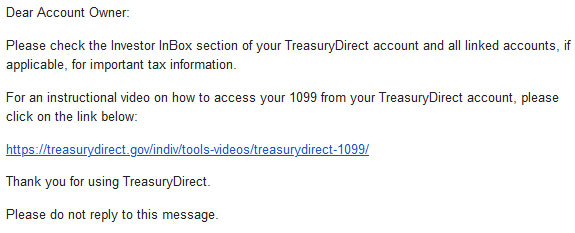
TreasuryDirect’s 2-minute video (which was produced several years ago) is actually helpful, and it plays on YouTube, so you can watch it right here:
As the video notes, if you are part of a couple with separate accounts, or if you have linked accounts from converting paper I Bonds, or child accounts, or separate trust or entity accounts, you will need to go to the linked accounts and get separate 1099s. In the case of a spouse, you will need to log out and re-login to that separate account to find the second 1099. Here is what TreasuryDirect says:
It is important to check ALL of your accounts, as a separate Form 1099 will be created for each one. If you have established Custom, Minor-Linked, or Conversion-Linked accounts, you must access each account to print the Form 1099 for that account.
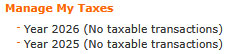
However, if you use your TreasuryDirect account simply to buy savings bonds (I Bonds or EE Bonds) and didn’t redeem any or have any mature in 2025, there will be no taxable transactions and you won’t have 1099s. You will see this on TreasuryDirect’s ManageDirect page:
TreasuryDirect is NOT going to mail you these forms. You need to hunt them down.
Important: Once you are inside the account section of TreasuryDirect, never click on your browser’s back button. If you do, you will be booted out of TreasuryDirect and you will have to log in again. To navigate, either click on the top row of tabs or click “return” at the bottom of most pages.

Here is the basic step-by-step process for finding each set of 1099s:
- Log into your TreasuryDirect account on this page. Click “Next.”
- Enter your account number and click “Submit.”
- After you enter the account number, you will get a message that a verification code has been sent to the associated email address. Open the email, copy the code and paste it in the box. Click “Submit.”
- Enter your password and click “Submit.”
- Now you are on your MyAccount page on TreasuryDirect. From here you can click on your Investor InBox in the upper navigation to see further instructions. The message will be titled “Tax Statement Notification.”
Important tax information for the recently concluded tax year is now available. The Form 1099 may be accessed through the ManageDirect tab in your TreasuryDirect account. A Form 1099 will NOT be mailed to you.
- Next, click on the “ManageDirect” link in the upper navigation. Under the heading, Manage My Taxes, select the link for the 2025 tax year. Then click the link: “View your 1099 for tax year 2025.” (Make sure to select 2025, not 2026.)
- At this point, you may get a huge listing of all of your interest payments, savings bond redemptions, potential capital gains and original issue discount accruals for Treasury Inflation-Protected Securities.
- TreasuryDirect does not offer an easily printable .pdf version of this form. To print it, click anywhere on the browser page and hit CONTROL P on a PC or COMMAND P on a Mac. This should open up a dialog to print the pages. (Mine was 10 pages long.)
- Print the 1099. (Your computer may also give you the option to “print to .pdf” which will allow you to save the document before printing.)
- Don’t have a printer? You can copy the entire text of the 1099 and paste it into a text or Word document. Save that file for reference when you fill out your tax return.
- At the bottom of the page, click on “Return.” Repeat the process for any additional spousal or linked accounts.
Just to make things more aggravating: Once you open your 1099 page, there will be no top tabs and you will need to scroll all the way to the bottom (10 pages!) to get to the “Return” button. Do not click on the back arrow or you will get logged out of TreasuryDirect.
Examine the 1099
There is a lot to see here, and you don’t want to miss anything that needs reporting to the IRS. On a 1099 from any brokerage or bank, everything is nicely organized and summed up, with clear references to the proper boxes on your tax filing. Not so with TreasuryDirect. In fact, this 1099 is actually a collection of 1099 forms, each with special purposes.
Form 1099-INT Interest Income
If you invested in any T-bills, Treasury notes or bonds, TIPS or redeemed savings bonds in 2025, you are going to see all interest-paying transactions listed here. In 2025 I was rolling over staggered T-bills at TreasuryDirect, plus had a collection of TIPS, plus redeemed a couple 0.0% I Bonds, so my list was enormous. Example:
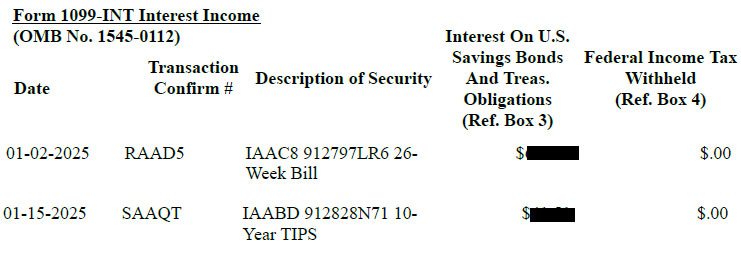
At the bottom of this long list, a long way down, is the total. Scroll all the way back up to the top to see that this total is Interest On U.S. Savings Bonds And Treas. Obligations and it goes in Ref. Box 3 on the federal tax form when you are filling out the section for 1099-INT. Here is the definition of Box 3:
Shows interest on U.S. Savings Bonds, Treasury Bills, Treasury Notes, Treasury Bonds and Treasury Inflation-Protected Securities (TIPS). … This interest is exempt from state and local income taxes.
You want to make sure the interest gets recognized as coming from U.S. Treasurys, because it will be free of state income taxes.
If you had any proceeds withheld for tax purposes (highly unlikely) those totals will be listed in column 5 of this section.
Form 1099-B Proceeds from Broker and Barter Exchange Transactions
There are several sections to form 1099-B and I generally have one or two transactions listed here. This is a very confusing section of the form and offers many opportunities for taxpayers to scream and pull out their hair. I believe the purpose is to show the Accrued Market Discount on longer-term investments that matured in 2025. This is my sole transaction listed for 2025:
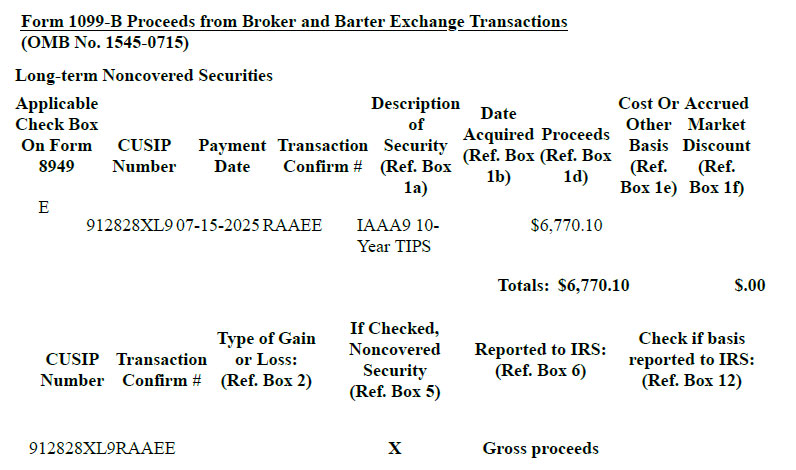
Reminder: THIS IS CONFUSING. I am leaving the dollar amount in this one because it is important in determining how to translate this to your tax return. For some reason, even though I bought this TIPS at TreasuryDirect in 2015, TreasuryDirect doesn’t seem to know how much I paid for it. So it is simply reporting gross proceeds.
Some taxpayers might assume they need to report that $6,770.10 as taxable income, which would be entirely wrong and costly. My original investment in this TIPS was $5,000 par value. The extra $1,770.10 I received at maturity was from inflation accruals, which have already been taxed every year for the last 10 years.
So the only taxable event here is: Did I buy this TIPS at a discount or premium to par value? My original cost was $4,957.48 (thankfully I have that recorded). Add $1.770.10 to that amount and you get a cost basis pf $6,727.58.
End result: I owe capital gain taxes on $42.52. (Plus an extra 15 minutes in TurboTax trying to figure out how to enter it correctly.)
Form 1099-OID Original Issue Discount
This is a very important section for investors who hold TIPS at TreasuryDirect. The 1099-OID lists annual inflation accruals for every TIPS held in the TreasuryDirect account in 2025. These inflation accruals are federally taxable in the year they were earned, even though they were not paid out but just added to principal.
Long-time investors in TIPS are familiar with the 1099-OID, but new investors at TreasuryDirect need to pay heed to this section and report it on their federal tax return.
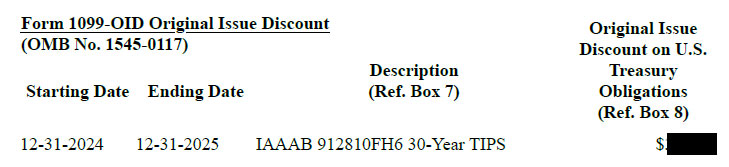
At the bottom of the list will be the total for all your TIPS holdings. TreasuryDirect notes:
Report this amount as interest income on your federal income tax return. … This OID is exempt from state and local income taxes.
Thoughts
I am no tax expert, so nothing you just read should be considered tax advice. Still, getting these 1099s from TreasuryDirect is EXTREMELY IMPORTANT. And make sure you do this for every account where you had taxable activity (such as maturing T-bills or redemptions of I Bonds).
You are going to get one email with a fairly cryptic message. That’s it. Nothing in the mail. Nothing you can download to Quicken. No .pdf. No easy-to-read tax summary like you receive from your broker. It’s up to you to go to TreasuryDirect, find the 1099s, print them, decipher them and report them on your tax return for 2025.
—————————

Donate? This site is free and I plan to keep it that way. Some readers have suggested having a way to contribute. I would welcome donations. Any amount, or skip it, your choice. This is completely optional.
—————————
Follow Tipswatch on X for updates on daily Treasury auctions and real yield trends (when I am not traveling).
Feel free to post comments or questions below. If it is your first-ever comment, it will have to wait for moderation. After that, your comments will automatically appear. Please stay on topic and avoid political tirades. NOTE: Comment threads can only be three responses deep. If you see that you cannot respond, create a new comment and reference the topic.
David Enna is a financial journalist, not a financial adviser. He is not selling or profiting from any investment discussed. I Bonds and TIPS are not “get rich” investments; they are best used for capital preservation and inflation protection. They can be purchased through the Treasury or other providers without fees, commissions or carrying charges. Please do your own research before investing.


 Treasury Inflation-Protected Securities
General pension question. Which would people take?
$15,500 cash lump sum @ 65
$1,280/year @ 65 for life, no COLA
I’d take the lump sum. That’s not what I did as a retired Fed, but the disparity between the lump sum and the time payouts was much greater in my case and we get COLAs. You should of course factor in how long you expect to live, and how much return you expect when you invest the lump sum.
Actually I think I mean the disparity was much “less”.
Personal opinion: If you are in good health, take the monthly payment — I assume it would be monthly. On the other hand, you could invest the lump sum and let it grow. If severe inflation strikes, that would probably work out better.
If you saved all the money and assumed a 7% return, you would breakeven around age 87 or 88. At a 5% return, your breakeven point would be around age 81 or 82.
I would probably take the lump sum and invest it unless I really didn’t need to spend of the money until my mid 80s and assumed I would live at least to 90.
It’s a good return for an annuity taken at that age, but it’s a small enough sum that it may not be significant in your budget (just over a hundred a month probably isn’t going to make a lot of difference). Put it this way: if you got a cash retirement bonus of that amount, would it even occur to you to annuitize it?
I suppose you may want to look at what taking the lump sum does to your taxes and what not. Possibly nothing, but possibly it would put you over some inconvenient threshold (e.g., for ACA subsidies or IRMAA).
I did my own table and at 3% crossover is at 80. At 2.5% 79 and 2% 78. But that is not considering taxes. For 2026 the lump sum would put some of the amount into the 22% bracket. Also there would be state taxes which may or may not be an issue at some point in the future.
But on the other hand with the lump sum it would be one and done. No need to be bothering with it on the tax return going forward, chasing after 1099s etc.
I believe I’d take the lump sum and put it to work in my longer dated TIP bond ladder… throwing off some more cash along the years while protecting the hard-earned capital into the future.
1,280/Yr., unless you’re not healthy and don’t expect to live that long. You will get the money back when you’re 78 and then if you have great genetics and will live a long time you get the payment till the end.
If you take the lump sum, most people will burn through it and in 3 years it will be long gone. If you invest it all in a good asset allocation with majority equities, you might be better off in 12 years, but the market is an unknown.
David, thank you for providing such level of detail in this article. This is my first year dealing with taxes on TIPS (held in my Treasury Direct account). There is one issue I am struggling with. I purchased CUSIP 91282CML2 twice (on Jan 31st and Mar 31st). I looked at the Security History section, and for the January purchase, it showed a small amount of accrued positive interest, a small amount of negative accrued inflation compensation and a positive discount amount. For the March purchase, it showed larger positive amounts for accrued interest and accrued inflation compensation with a zero discount. I cannot find the positive accrued interest amounts for this CUSIP anywhere on my 1099. They do show a Bond Premium on Treasury Obligations (Ref Box 12) for this CUSIP; but the small positive amount shown ($5.00) does not match any of the other amounts on the two Security History pages. Is there some formula I am not aware of that I should be using? Or could my 1099 be inaccurate? Thanks very much for any insights you can provide!
One oddity of TreasuryDirect is that it will always list opening and reopening purchases of same TIPS separately, even when it pays out interest. Accrued interest is something you paid, not earned. (It was paid back later at the first coupon payment, so your accrued interest should have been subtracted from the interest earned.) I would not try to rely on the Security History page for anything other than details of your original purchases.
The 1099-INT should simply show the interest you actually earned in 2025, and the 1099-OID should show the inflation accruals for these TIPS, listed separately.
Reporting accrued interest to the IRS on a 1099 is not required. Treasury Direct does not include it on the 1099, my brokerage does and references the accrued interest is “supplemental information not reported to the IRS”. On a tax return, the taxpayer can subtract any accrued interest paid from the total interest earned shown on the 1099. A taxpayer needs to rely on their records, which would include Treasury Direct Security History information, as documentation for any accrued interest.
Thanks very much, Scott, this is what I thought re: accrued interest paid.
Thanks David for the heads up on this. I also got a e-mail from TD about it being available.
Mine wasn’t too complicated this year. I only have interest payments to report but the format, as is being noted, was a little cumbersome.
It was 11 pages long and cut and pasted it to a word document. I adjusted the font size to reduce it to 9 pages. Then I printed it as a pdf document. I printed out the first three pages with the pertinent information and saved the entire document with the other 6 pages of ‘noise’ with my electronic files.
I believe I managed to transfer my one annually taxed investment to a brokerage in 2024, so I won’t have to deal with this😊.
Year 2025 (No taxable transactions)
lovely
I use my web browser to save the Treasury Direct 1099 as a PDF. I do print it out with all my other tax-related forms to have a paper copy of my final tax return, although I could just leave it all digital.
I’ve found it’s not too hard to get to and print the 1099 on TD. The good news is at least the next 3-years us over 65 can get an additional $6K deduction on our income.
Just to clarify, not everyone over 65 benefits from this new deduction:
Income limits & phase-out (2025 tax year)
Single filers:• Full $6,000 deduction if MAGI is $75,000 or less• Begins phasing out above $75,000• Fully phased out (zero) at $175,000 or more
Married filing jointly:• Full $12,000 total deduction (both spouses) if MAGI is $150,000 or less• Begins phasing out above $150,000• Fully phased out at $250,000 or more
And Married Filing Separately do not qualify for the deduction. Must file joint to get it.
Ironically, when you redeem a paper Series EE bond, even though it was originally purchased from the Treasury, it is not reported on a Treasury Direct 1099-INT, but rather on a 1099-INT of the bank where you redeemed it. It’s a little counterintuitive until you realize the D in TD, although it stands for Direct, really applies to Digital Treasury holdings.
Also, if you only invest in I Bonds and Treasuries (t-bills, t-notes, and t-bonds) on TD, you should only have to worry about the 1099-INT portion of the tax form, as far as I understand it.
Wow what a pain. I haven’t yet started to redeem these things but I’ll hope my accountant can sort it out when the time comes. I have bought I bonds and EE bonds in round numbers: $500, $1000, $5000, $10,000. That should help with the calculations. And to remind the accountant no state and local taxes on US savings bonds. I have a big federal tax bomb on the horizon– I bonds purchased in 1999, 2001, and 2002.
Another pain in the but feature of TD. I found some old 1099s in there, not significant money from years ago. Never got any emails. Where is Doge to update to a modern system?
I will file this one for my 2026 return as I will be selling this year. Thanks.