
How exactly does Treasury do this calculation?

By David Enna, Tipswatch.com
It’s late October, and normally I would be writing a tome advising readers on investing in Series I Savings Bonds either before or after the November 1 rate reset.
Not this year. There is zero reason to invest in I Bonds under the current six-month terms: Fixed rate of 0.90%, inflation-adjusted variable rate of 3.34% and composite rate of 4.26%. All of those rates are going to increase with the November 1 reset (which should be announced Friday, Oct. 30).
Variable rate
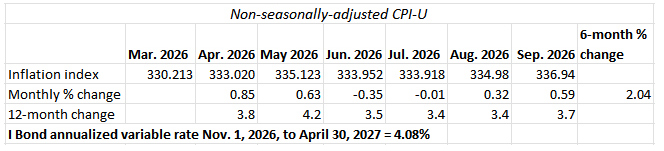
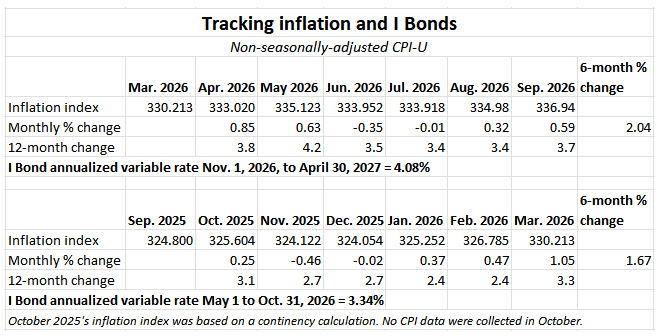
We know the annualized variable rate is going to increase to 4.08%, based on 2.04% inflation from April to September. That’s locked in and it’s a big jump from the current 3.34%. All I Bonds, no matter when they were issued, will get the new variable rate, rolling in for six months depending on the original purchase month.
The fixed rate
The Treasury has no announced formula for setting the I Bond’s fixed rate, and there is no legal requirement to follow any formula. This is up the discretion of Treasury officials, based on current real yield trends. TreasuryDirect provides this cryptic information:
The Secretary of the Treasury, or the Secretary’s designee, determines the fixed rate. The rate is based on market rates that have been adjusted to account for the value of components unique to savings bonds. These include the early redemption put option, tax deferral feature, deferred purchase feature, and Treasury’s administrative costs.
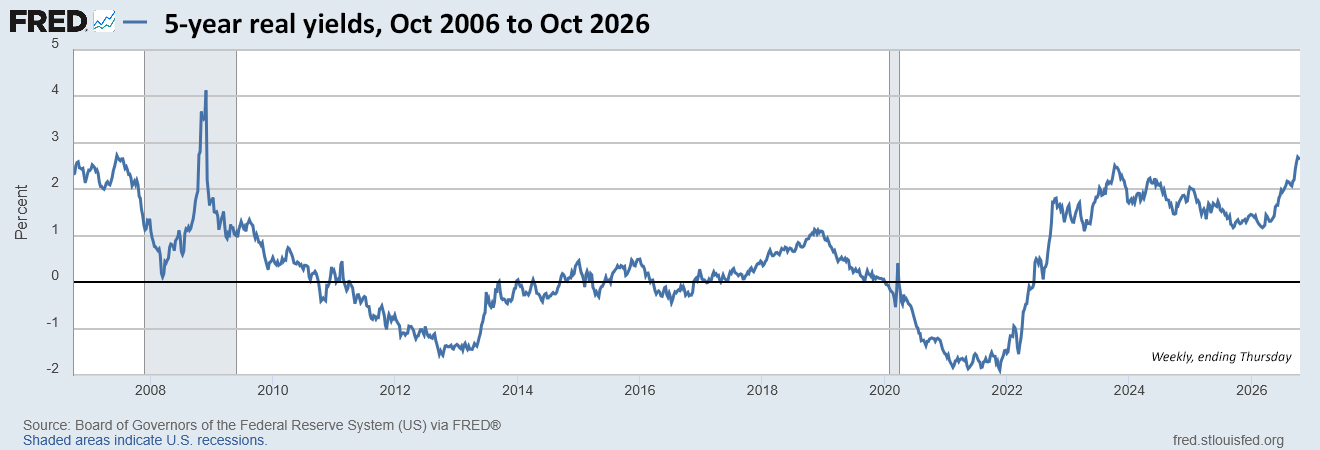
We do know, however, that for a decade this formula has accurately predicted the I Bond’s fixed-rate reset: Apply a ratio of 0.65 to the average 5-year real yield over the preceding six months.
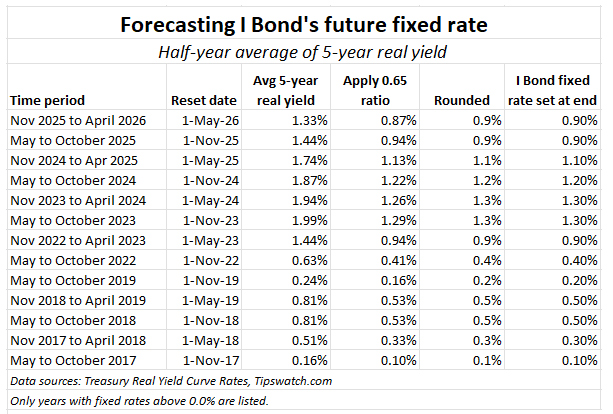
But now — for the first time — we face the question: When does the six-month period begin and end? In my calculations, I have always started the count on the first day of the reset, May 1 and November 1. And I set the end date a day or two before the rate decision, and every time I had the correct forecast.
However, there is another theory used by Boglehead geniuses: Start the six-month period 5 market days before the previous reset and end it 5 days before the next reset. This also has produced the correct result for a decade.
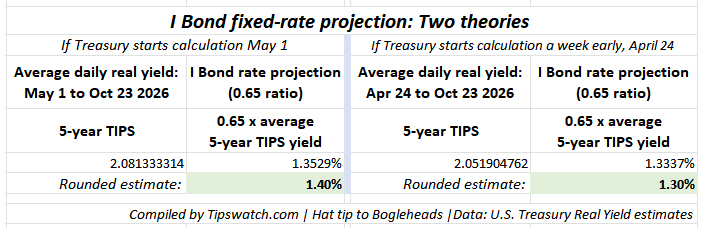
This matters in October 2026 because for the first time, applying the two theoretical formulas results in a different forecast:
Things to keep in mind:
- The Treasury rounds the fixed rate to the tenth decimal point, so now that the ratio for the May 1 start has reached 1.3529%, nothing that happens this week will change the 1.40% forecast, unless the 5-year real yield plummets 33 basis points.
- The April 24 start-date forecast is also locked in, because the Treasury would be ignoring any further data.
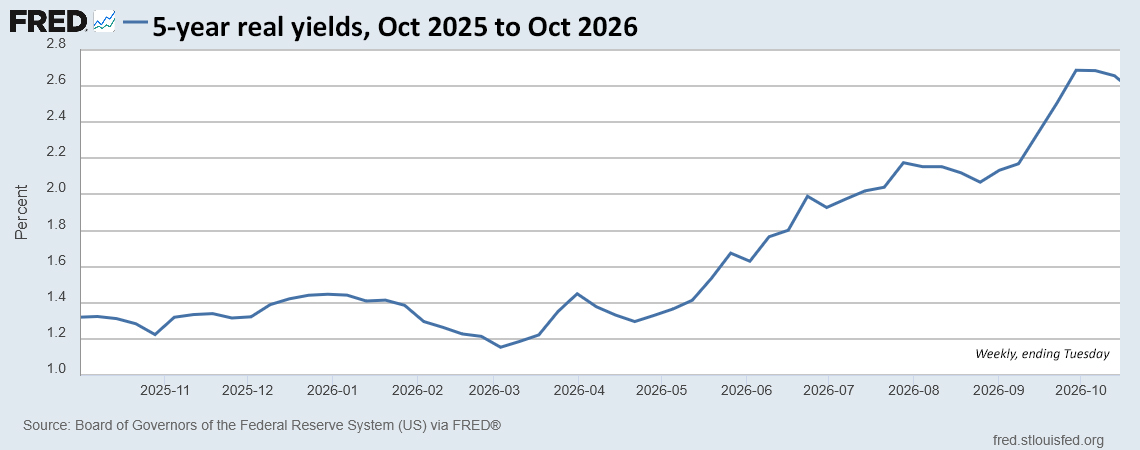
- The April 24 start results in a lower forecast because 5-year real yields at the end of April were much lower (about 1.35%) than they are now (about 2.34%).
So we have two different forecasts: 1.40% or 1.30%, and there is no way to know which one is correct. The Treasury’s decision, coming Friday, is going to tell us a lot, assuming it follows practices of the last decade.
I am going to stick with my traditional forecast method and say the fixed rate will be 1.40%. But … 1.30% is certainly possible. Or the Treasury could just abandon past practices and throw us all under the bus.
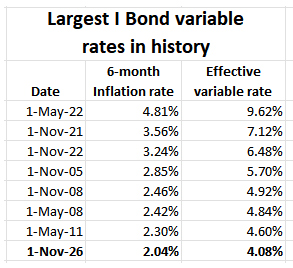
A fixed rate of 1.40% would be the highest for the I Bond since November 2006.
Composite rate
The composite rate isn’t simply the sum of the fixed rate and the variable rate, it is calculated with this formula:
Composite rate = fixed rate + (2 × semiannual inflation rate) + (fixed rate × semiannual inflation rate)
Here is how the math works for the 1.40% fixed rate:
- Fixed rate: 0.0140
- 2 × 0.0204 = 0.0408
- 0.0140 × 0.0204 = 0.0002856
Add 0.0140 + 0.0408 + 0.0002856 and you get 0.0550856, which rounds to a composite rate of 5.51% annualized.
A six-month composite rate of 5.51% is very attractive at a time of T-bill yields of about 4.11%. Even with a couple Fed rate increases, the I Bond will be attractive.
If the fixed rate is 1.30%, the composite rate will be 5.41%, also very attractive.
An investing strategy?
TreasuryDirect has now posted this rather irrelevant notice on its homepage:
Rate Change Deadline: To receive the current 4.26% rate for I Bonds in TreasuryDirect, you must complete your purchase by 11:59 p.m. on Thursday, October 29. The bond would have an issue date of October 2026 and secure the current interest rate.
Obviously, do not invest in I Bonds this week in the days before the rate reset. Wait until November to get the higher fixed rate, higher variable rate, and higher composite rate. And if you are buying in November, wait until late in the month to make the purchase, since you will earn a full-month’s interest no matter which day you purchase. Maybe set a target of Nov. 25, to allow time to clear after Thanksgiving?
What if you purchased earlier in the year, as I did? You can call yourself “dumb,” but remember that just before the May reset, the 5-year real yield was still very tame in the range of 1.35% and the Fed looked likely to cut rates instead of raise them. No one could really predict the very strong surge in real and nominal yields.
I Bond purchases are limited to $10,000 per person per year unless you add to your holdings through gift-box, trusts, or business-owner strategies. The gift-box strategy still seems to be working, for people with a trusted partner.
Otherwise, wait until 2027. You will have until late April to purchase to get the full six-month benefit of the high composite rate and permanent fixed rate. That’s what I will do.
And a reminder: As of Oct. 28, to access TreasuryDirect you must have created a log-in account with ID.me, a private company that TreasuryDirect is using for verification. More on that here.
I Bonds vs. TIPS
These are two similar investments, both attractive, but in my mind they have different purposes.
I Bonds create a cash-equivalent, inflation-adjusted savings account that you can draw on at any time after 1 year with a small penalty or 5 years with no penalty. The value can never decline and all interest is compounded. That creates a useful pot of tax-deferred money to use when you need the cash.
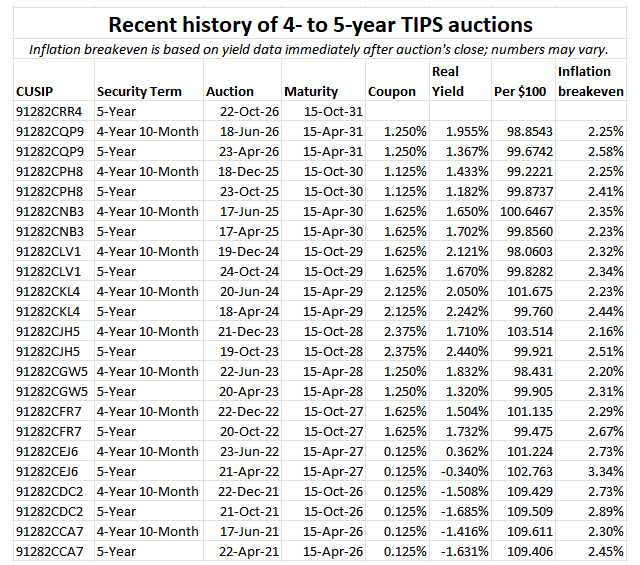
Treasury Inflation-Protected Securities at the moment have much higher real yields and are perfect to buy and hold to maturity for specific spending needs in the future. TIPS are subject to constant changes in value. Current real yields make TIPS more attractive than I Bonds as a “pure investment.” But I Bonds have better compounding, better deflation protection, tax-deferred interest, and a flexible maturity date.
EE Savings Bonds
I don’t know of a formula for predicting the new fixed rate of EE Bonds, currently 2.40%. I expect this rate to rise, and for the Treasury to continue its policy of doubling the EE Bond’s original value if held for 20 years, creating an effective yield of 3.53%.
Qualifications
The projections presented in this article are based on 10 years of Treasury history in setting the I Bond’s fixed rate. But the Treasury could change course at any time. So far, in both of President Trump’s terms, the rate formula has remained accurate.
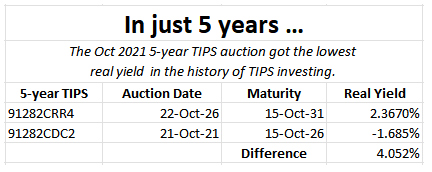
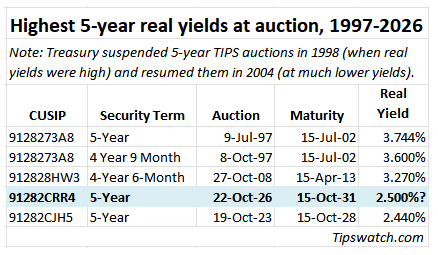
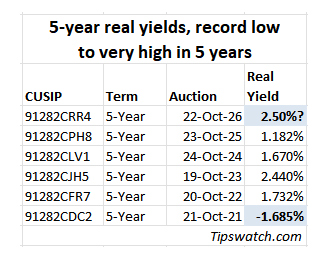
Keep in mind that the Treasury actually saves money by lending to I Bond investors at a real yield of 1.40% as opposed to the current 5-year real yield of 2.34% or 30-year real yield of 3.08%. Plus, savings bonds account for a minuscule portion of Treasury debt.
• Confused by I Bonds? Read my Q&A on I Bonds
• Wise advice: ‘Don’t die with I Bonds’
• Let’s ‘try’ to clarify how an I Bond’s interest is calculated
• Inflation and I Bonds: Track the variable rate changes
• I Bonds: Here’s a simple way to track current value
• I Bond Manifesto: How this investment can work as an emergency fund
—————————

Donate? This site is free and I hope to keep it that way. Some readers have suggested having a way to contribute. I welcome donations, any amount. And FYI, ads on this site pay for about one visit to Costco.
—————————
Follow Tipswatch on X for updates on daily Treasury auctions and real yield trends (when I am not traveling).
Feel free to post comments or questions below. If it is your first-ever comment, it will have to wait for moderation. After that, your comments will automatically appear. Please stay on topic and avoid political tirades. NOTE: Comment threads can only be three responses deep. If you see that you cannot respond, create a new comment and reference the topic.
David Enna is a financial journalist, not a financial adviser. He is not selling or profiting from any investment discussed. I Bonds and TIPS are not “get rich” investments; they are best used for capital preservation and inflation protection. They can be purchased through the Treasury or other providers without fees, commissions or carrying charges. Please do your own research before investing.



I agree with Marce on this. Even if Democrats win both houses of Congress (it's possible) the result will be…