
Here is a guide to a workaround.
By David Enna, Tipswatch.com
It’s a new year and I am sure a lot of investors in Series I and EE Savings Bonds are using TreasuryDirect’s Savings Bond Calculator to determine year-end values for their investments. This year, though, there is a problem.
Using the calculator involves clicking on an .html file stored on your computer, which opens a summary of your investment values. To update those values, the user clicks on the “Return to Savings Bond Calculator” link to export the values into the calculator. No login to TreasuryDirect is necessary.
Here is what the link looks like in the Firefox browser.

Once you enter the calculator, you can update the values, edit the list if necessary, and re-save the file as an .html document to your computer. Success! If you have done this before you know how it works. If not, read my step-by-step guide on using the calculator.
The problem
Since sometime in late 2025, the .html file you save back to your computer can no longer link back to the Savings Bond Calculator. When you click on “Return to Savings Bond Calculator,” nothing happens. (For this reason, I recommend always using an updated file name when you re-save the file. For example, use the current month in the new filename. Your older file will still connect, since it is not broken.)
I have tested the broken link issue in Firefox, Chrome, and Edge browsers and the newly saved file fails in all three.
Obviously, something has broken in the .html file created by the calculator. A reader altered me to this issue last week and noted, “I called TD and talked to them and they say that they are aware of the problem and are working on it. They had no estimate as to the timeline.”
This is especially frustrating at a time when investors want to create year-end updates of their holdings. However … remember that any older .html file you have saved will still connect and can be updated. The problem is that when you re-save that file, it will no longer reconnect.
I have to wonder: “Is this a staffing-shortage problem?” Or “Is there a security issue with the current link that needs to be fixed?” We don’t know and TreasuryDirect has no warning on the calculator indicating there is a problem.
The workaround
I searched around for a solution and on Bogleheads (of course) I found a workable but clumsy way to fix the broken .html file.
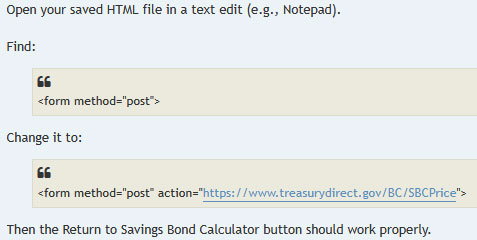
I tested this process and it does work. The problem for a lot of people, though, will be figuring out how to open the .html file in a text editor and then alter it. Apparently, this issue is baffling for TreasuryDirect because it hasn’t fixed the problem.
Step by step
I used the calculator to create a fake I Bond portfolio to test the process. Here is what it looks like:
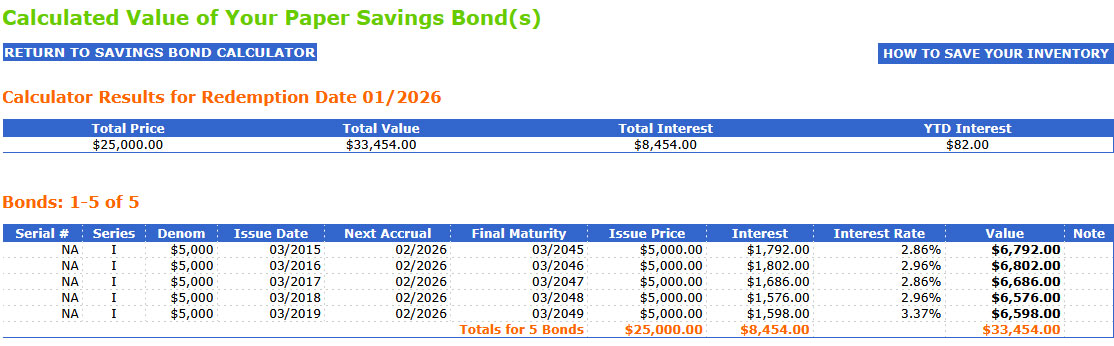
Then, I right-clicked on that page and saved the list as an .html file to my computer. (It’s important to remember where you put the file and what you called it. Use a unique name for every update.)
When I click on the resulting .html file on my computer, I get this:
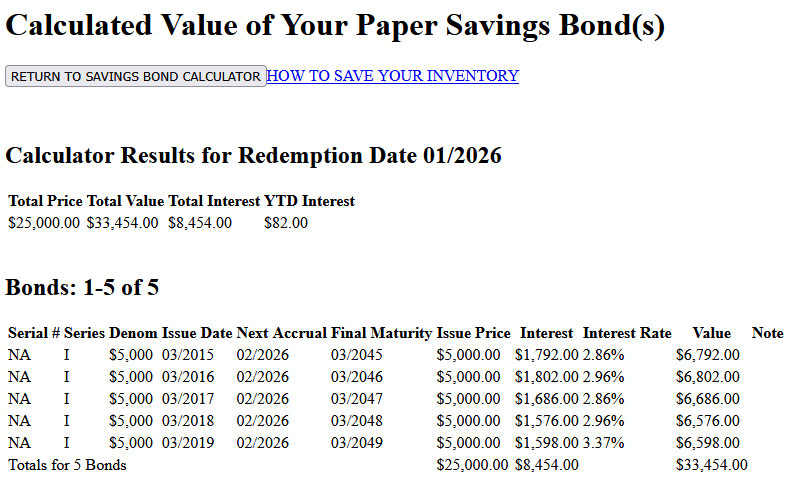
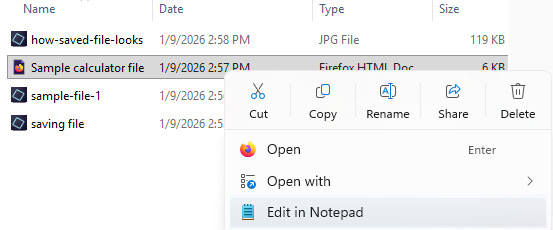
At this point, the “Return to Savings Bond Calculator” link will not work because this is a new, broken .html file. So I have to open it in Notepad (or any text editor) to alter it. The next step is to right click on the file name and have it open in Notepad:
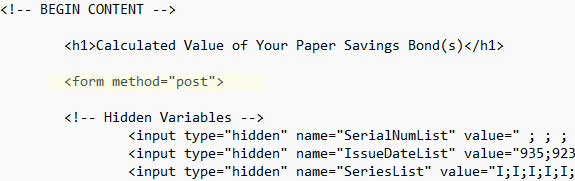
Here is what you are looking for in the broken file:
And here is how it needs to be altered:
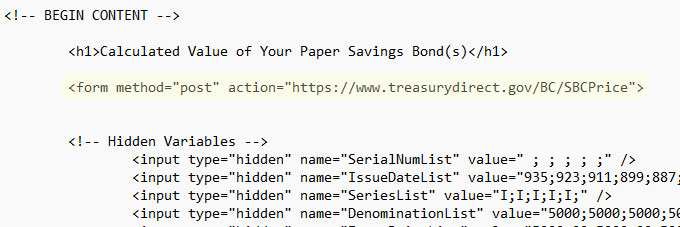
You don’t need to type all that out, just copy and paste this:
<form method="post" action="https://www.treasurydirect.gov/BC/SBCPrice">
Important. Once the editing is complete, re-save the file as an .html document. That means you should simply “SAVE” it. Do not use “SAVE AS” because Notepad will then save it as a .txt document and not .html. It’s fine to overwrite the broken version. The newly edited file should now work. Click on it and here is the result from my example.
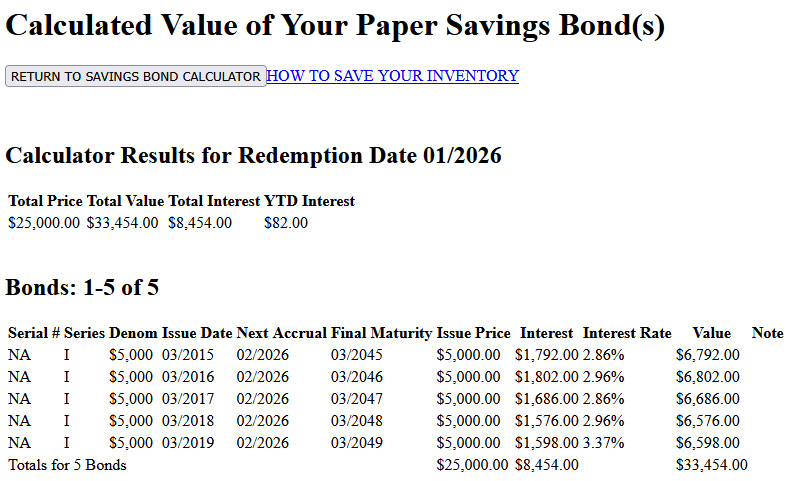
When you click on “Return to Savings Bond Calculator” you successfully return to the calculator where you can update your holdings and add or remove savings bonds from your portfolio:
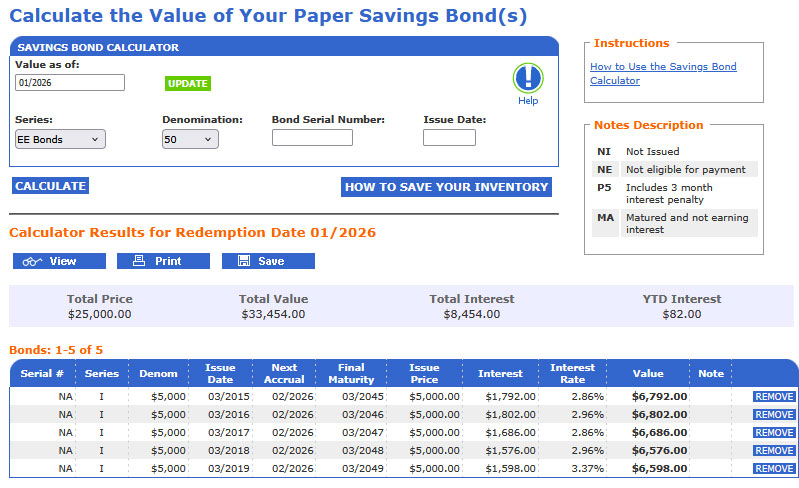
Until TreasuryDirect fixes this issue, you will need to use this workaround every time you save a newly updated .html file.
Thoughts
The Savings Bond Calculator is a valuable tool for I Bond investors. It gives accurate results in a simple, editable format. TreasuryDirect warns that is should only be used for paper I Bonds, but it works fine for electronic versions.
Why not just log into TreasuryDirect to view your holdings? In TreasuryDirect, you can see the total value of the holdings, but for each I Bond you can see only the current composite rate, not the fixed rate. That can get confusing since composite rates change at different months through the year, depending on the month of the original purchase.
With the Savings Bond Calculator, you can combine a listing of two accounts (spouses, for example) and make notations on the account holder and the fixed rate for each I Bond. (I use the serial # field to do this. For example: Husband 0.2% or Wife 0.5%). So you get a complete picture of your combined holdings, and it is very easy to locate the lowest-fixed-rate I Bonds if you want to redeem those. Plus, you can also add in any converted I Bonds, which I have also done. And it is an absolute necessity for people still holding paper I Bonds.
Because the Treasury has stopped issuing paper savings bonds of any form, I have worried that it will discontinue use of the Savings Bond Calculator. That would be a disappointing and frustrating decision.
Fixing this problem appears to be quite simple, just altering one line of code. But we have no timeline from TreasuryDirect for a fix, or if there was a rationale for breaking it.
Does the Savings Bond Calculator create security issues for the user? I doubt it. Remember that the calculator file is stored on your own computer, contains no personal or account information, and interacts with TreasuryDirect without any login information. I was able to use a fake investment file to test the system because it runs outside the TreasuryDirect login.
• Confused by I Bonds? Read my Q&A on I Bonds
• Let’s ‘try’ to clarify how an I Bond’s interest is calculated
• Inflation and I Bonds: Track the variable rate changes
• I Bonds: Here’s a simple way to track current value
• I Bond Manifesto: How this investment can work as an emergency fund
—————————

Donate? This site is free and I plan to keep it that way. Some readers have suggested having a way to contribute. I would welcome donations. Any amount, or skip it, your choice. This is completely optional.
—————————
Follow Tipswatch on X for updates on daily Treasury auctions and real yield trends (when I am not traveling).
Feel free to post comments or questions below. If it is your first-ever comment, it will have to wait for moderation. After that, your comments will automatically appear. Please stay on topic and avoid political tirades. NOTE: Comment threads can only be three responses deep. If you see that you cannot respond, create a new comment and reference the topic.
David Enna is a financial journalist, not a financial adviser. He is not selling or profiting from any investment discussed. I Bonds and TIPS are not “get rich” investments; they are best used for capital preservation and inflation protection. They can be purchased through the Treasury or other providers without fees, commissions or carrying charges. Please do your own research before investing.


 Treasury Inflation-Protected Securities
2025 I-Bond 1099-INT are available NOW at Treasury Direct
Thank you! I will need to post something soon.
I have many electronic I-bonds. Many are $1000 I-bonds purchased at the same time. I combine all those into $10,000 I-bonds using pencil and paper. Eventually, I end up with thirteen $10,000 I-bonds. I enter all those into the Savings Bond Calculator a couple of days after the new variable rates are released. From there, I get the current month total value, and then each of the next five months’ total values. From these I simply calculate using subtraction each month’s interest rate. I enter it all into Quicken. The whole process takes less than ten minutes. I only have to do it two times in a year. It never occurred to me to try to save all of them to a file. Just as well as it turns out.
If you purchased I-bonds at lots of different dates, then my method would be a big hassle and saving them to a file would make sense, if the file could be loaded back again, which appears to be a problem. Treasury Direct never fails to reveal the incompetence of government. Seems every other month a new problem arises. It will be a huge mess if they ever “update” their 1980’s retro website, which is probably why they don’t want to do it. (I have to admit it was sort of cool to get that credit card sized card with my magic code on it. They don’t do that anymore).
David, what do you think of Powell and his comments?
The threat of a criminal indictment and Powell’s strong response were both surprising. What kind of game is this? Powell will end his time as Fed Chair in May, but now he may stay on at the Federal Reserve, which means the threat strategy has backfired. The White House has been quickly backing away. We didn’t need this.
This unprecedented attack on Fed independence as retribution for non-compliance with White House (Trump) pressure to artificially lower interest rates for political reasons is completely unsurprising and fits the pattern we saw throughout 2025. Without extreme tariffs, interest rates would’ve been lowered sooner and inflation would have hit the Fed’s 2% target since CPI was down to 2.3% in April before tariffs were enacted. The positive news yesterday is that Republican senators weren’t silent on this matter and pushed back immediately giving some hope rationality may prevail.
I found another work around. I had saved a December 2024 inventory. Opened it and ‘return to savings bond calculator’ worked for me. was able to update and save inventory for Feb 2026. all looked accurate.
I’m using Safari on a Mac, and when I open the html file with TextEdit, I do not see the text to be edited. All I see is the form itself as if I had double-clicked on the html file to open it from the desktop as I always have. What am I doing wrong?
Same here, though I have been using Firefox recently, so it may be a Mac issue. I noticed that the .html file shows “locked” at the top.
I had the same Mac problem! The solution is:
Nice work, Dave.
REALLY appreciate the wisdom in this online community! Thank you, Dave!
It’s also interesting that the site says it doesn’t work in Edge. I can confirm that those instructions are wrong. Maybe it didn’t work at one point, but it works just fine now on Windows 11 and the latest version of Edge.
The same problem this article is about still exists of course, but that’s not a browser problem. That’s a server side issue where the proper code is not being delivered to the web browser for it to be saved correctly. Any time you make a change to your online instance and then save it again, for the moment, this problem is going to happen until TD fixes it.
The current Microsoft Edge is a rewrite based on Chromium. There was a different Microsoft Edge (with an “e” logo reminiscent of IE instead of a green swirl), now discontinued, and that is likely the one that was not compatible.
Why wouldn’t you just use the eyebonds.info calculator?
Even easier, I just use the reported values on the eyebonds.info http://eyebonds.info/ website’s I Bond page for the bond I hold and update the “price” in my Quicken record of the transaction, so I have cost basis and current market value of the bond. This website is great for I Bonds! For instance, my April 2003 $10,000 I Bond has a current “price” of $260.56.
Jim at I was Retired
>
I agree on the high quality of Eyebonds.info, but I would prefer not to have to update individual I Bonds. In Quicken, I just use a total for I Bonds and update it occasionally. The Savings Bond Calculator is my “go-to” for accurate records when I want to redeem or add I Bonds.
In Quicken when I add a new I bond purchase, in the security name, I add the husband/wife and fixed rate, plus purchase year/month, right in the name, so I can see that at a glance (Security: “I bond 2024-10-01 IAAAB Husband 1.3%”; I wait until gift delivery to get the IAAAB symbol). The downside in Quicken is I manually edit the price history for the current month (or only when I feel like it) for each bond. At redemption time, I make a Quicken Portfolio Value and Cost Basis report, selecting only the TD account. Right there I have the current value and unrealized gain and can cherry pick whatever combination of highest/lowest gain along with lowest fixed rate (right there in the security name), and then imported that to a spreadsheet. It’s easy enough to look at the purchase date in the name to see if it’s met the 5-year holding time. I went through this process when I replaced all my 0-percenters for 1.3% and 1.2% fixed rates. Another thing I did in the spreadsheet was for the 3 months loss of interest (in less than 5-year held 0% bonds), calculate if waiting for the next inflation rate to drop to sell then, vs calculating whether it pays to sell early giving up 3 months of a higher inflation rate, vs reinvesting now at a new better fixed and composite rate (in most or all cases at the time it was a better deal to sell earlier).
BTW I retested the I bond gift plus 5 day delivery in late December and it’s still wide open.
BTW David Mr. TIPSWATCH, I don’t know if there’s any way to contact you outside of these comments (I couldn’t find it), but I would send you an email or otherwise contact you if I could. Perhaps if nothing else I could send you a private message on Bogleheads (I’ve not tried that yet)? I have thoughts on comparing/calculating TIPS vs I bond, and other things.
If you go to the About Me page, you can click on my name in the first sentence to send me an email.
I find this one easy to use.
https://eyebonds.info/downloads/pages/IBondMonthlyCalculator.html
My problem with this tool is it does not allow you to enter a single $10K IBond. It will give you an error message telling you that there haven’t been $10K paper bonds since 2008, and it will refuse to add it. It makes no sense, so I gave up on it in 2023 when I traded my high rate COVID bonds, which were in $5k denominations for $10K ones to cut down on paperwork.
I’ve tried other websites, and while they all get there in the end none of them are really satisfying. TreasuryViewer is one example, though the authors seem to really no longer update that app that I can tell. And while it’s supported, it seems, their website calculator consistently is wrong on timing for IBond interest (they don’t seem to pay heed to the 3 month interest hold among others). And doing anything more complicated that viewing a few bonds requires an annual subscription.
I really wish TD would just update this to work for all bond values, paper or electronic. The save feature doesn’t work in Edge, the new Windows web browser, and you can confirm that the downloaded page doesn’t include it by looking at the ‘View Source’ option in your webbrowser.
For anyone where it still works, you likely I’m guessing have an older copy when it did work and you haven’t added any new bonds to it or resaved a new version in awhile.
Yes, I Bonds can only be entered in $5,000 increments because TD insists this tool is for “paper savings bonds only” and the only paper I Bonds issued in recent years were tax refunds capped at $5,000. I agree it is dumb, but just a minor hassle. You have to enter each $10,000 purchase as two $5,000 transactions.
Agree, though that’s math (however simple) I’d still prefer to not have to do when I’m updating Quicken at the start of the month!
My problem with all the other calculators is even when they are ‘correct’ at some point on their time scale, none of them seem to treat the first 3 months of held interest correctly.
I will be honest, I haven’t owned an I Bond past 5 years, so I don’t know how TD handles that. Do they just add back in the held interest starting at year 5?
Treasury Viewer and eyebonds.info both agree for instance that a $10k bond issued in Nov 2023 should have a present value of $10,956 and a correct composite rate of 4.44%. But TD says that bond is currently only valued at $10,836, which is what I would get if I cashed it in today. That’s $120 difference in value.
ibondcalculator.com says that same bond is worth $10,732, which is wrong. And it says the composite rate is 3.98% which is also wrong. Though they are the only site that shows what a 3 month penalty looks like (even though at $10,628 it’s wrong there too).
For fun, I went through and edited all of the values in the saved file to be for $10k I Bonds. As I suspected, the check on the webpage is only during entry. The calculator works after words if you edit everything and re-upload it.
I suspect TD says they will work on it at some point as since they view these pages as only working for paper bonds, I suspect this is just not a high priority.
I for one wish they would fix it and make it so it works for electronic bonds as well.
This is a great experiment, thanks for that. I wouldn’t reconstruction my portfolio, but for someone new to the calculator, it could work.
@noisy141e158b13
While I understand your issue with the 3-month holding, as someone who doesn’t cash in the ibonds under 5 years, for me that’s a feature not a bug in those calculators. Personally, I prefer the eyebonds spreadsheet. And if you want to factor in the 3-month holding you just have to look to the 3 months earlier cell in the spreadsheet and that’s your number.
Logging in seems like a much simpler process. Or keep a SS and use Eyebonds.info
Please ignore/delete my comment above!
I was using the very old Savings Bond Wizard, so of course it works fine. I’m sure if I used the website as detailed above, it would have the problem you’ve described. Sorry!
I don’t have that problem on my computer. I just exported a new .sbw file as .html, and tried it in Brave, Edge, Opera, and Firefox. The “Return to Savings Bond Calculator” link worked fine in all browsers.
Could this be a Windows problem? I’m still using Windows 10.
What nonsense to imply staffing issues. If it supposedly only takes one line of code, as you say, then it’s not a staffing issue. More to do with general Government ineptness from a site that historically is slow and inefficient.
only 1 line in the outputted html file, no telling how may lines of code they are using to generate that one line of output and more importantly no way of telling how many current staff are familiar enough with the code that generates the output to quickly find where it’s wrong and know how to fix it. Any even if they still have someone on staff capable, clearly the higher-ups don’t see it as a high priority item to be worked on.
What am I missing? Can’t you just login to TD and see the value of your iBonds?
“paper bonds”
Never mind!
With the Savings Bond Calculator, you can combine a listing of two accounts (spouses, for example) and make notations on the fixed rate for each I Bond. So you get a complete picture of your combined holdings, and it is very easy to locate the lowest-fixed-rate I Bonds if you want to redeem those. Plus, you can also add in any converted I Bonds, which I have also done. And it is an absolute necessity for people still holding paper I Bonds.
In TreasuryDirect, you can see the total value of the holdings, but for each I Bond you can see only the current composite rate, not the fixed rate. That can get confusing since composite rates change at different months through the year, depending on the month of the original purchase. I use the Savings Bond Calculator to keep an accurate accounting.
(Note: This was a good question and I incorporated this comment into the article.)
I don’t use this feature, but I do periodically check up on the valuation. I have I-Bonds with them that are over 25 years old with substantial accrued and untaxed interest. Another reason to stay away from Treasury Direct.
Thanks David. I’ve had to use this fix the last few months to correct my Savings Bonds HTML files. It’s frustrating that such a simple fix has lingered as long as it has (I’m a software developer).