
By David Enna, Tipswatch.com
Based on reader feedback I’ve seen, it looks like most people are having no problems logging into TreasuryDirect‘s new system once they have completed verifying a login account with ID.me.
That’s good. The bigger problem, of course, is completing the ID.me verification process, which requires several steps. We are now in the “soft-launch” stage but an ID.me account will be required for access to TreasuryDirect beginning October 28.
This is a video created by the Social Security Administration to walk a user through the ID.me account-creation process. (I have no idea why TreasuryDirect has not created a similar video for its site):
The video details how a registrant using a computer would have to complete the process using a phone with a camera. The verification process is complex and can sometimes fail, especially when taking a “selfie photo.”
For more information, check ID.me’s guide to account setup.
The TreasuryDirect login
Once ID.me verification is properly completed, logging into TreasuryDirect is a simple process, as many readers have reported. TreasuryDirect did create a video for this part of the process. Here is the link (the video is not yet on YouTube).
My personal experience
As I have noted in past articles, my wife and each have a TreasuryDirect account. In the past, both accounts were linked to my email, so I could log into both and manage investments. My wife’s account is our “main account,” combining I Bonds (some redeemed this year) with a few T-bills and long-ago TIPS purchases. This is the account with the all-important tax documents. My account holds only I Bonds, and none have been redeemed in 2026.
My wife is currently traveling overseas. Before she left she attempted to set up an ID.me account, but I think that process was not completed. So set-up for that account will have to wait a few weeks.
Reminder: Under the ID.me process, one user will be able to manage a personal account and trust or entity accounts connected to that Social Security number and email address. But one user will not be able to manage two personal accounts with a single ID.me account.
I decided to go ahead and complete the login process for my account with ID.me, to get an idea of the experience. As readers have noted, it was simple, pretty much matching the TreasuryDirect video. Here’s a visual look:
Click login on the main page.
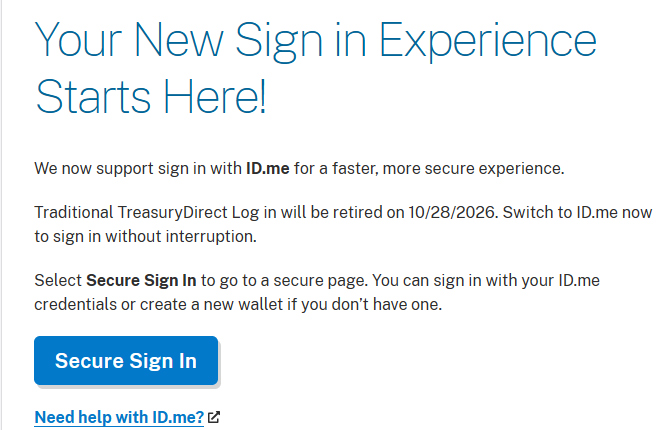
Click Secure Sign In to go to this intermediary page:
And then …
Enter the email address connected to your ID.me account.
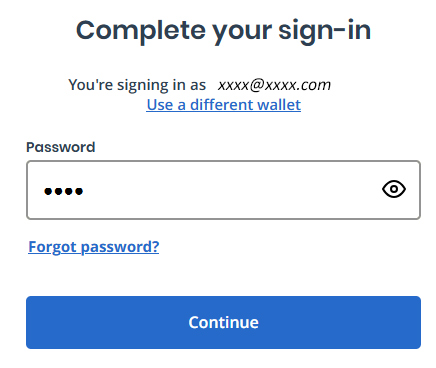
And then the password.
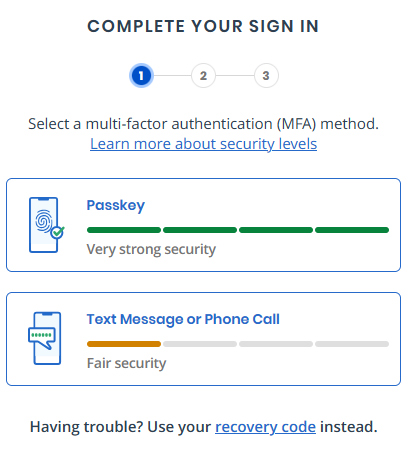
Select the multi-factor authentication method. This step seems a bit odd to me, because a text message with “fair security” is offered as an option. But at least for me, using a desktop computer, the text message was the only option. The passkey option required — possibly — a fingerprint, which can’t be done on my computer.
I have used this process before for the IRS and have always used the text-message option. Just make sure to have your phone nearby.
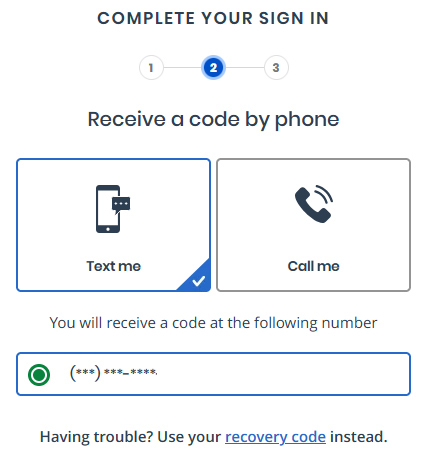
Confirm the “text me” and check that the phone number digits match your device. I have hidden the numbers in this example.
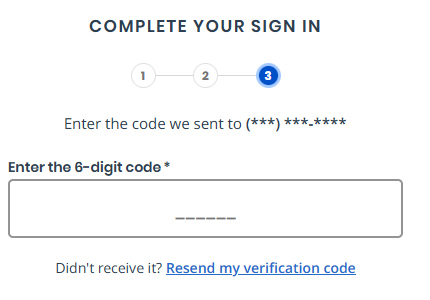
Check your phone for the text message and enter it on this screen.
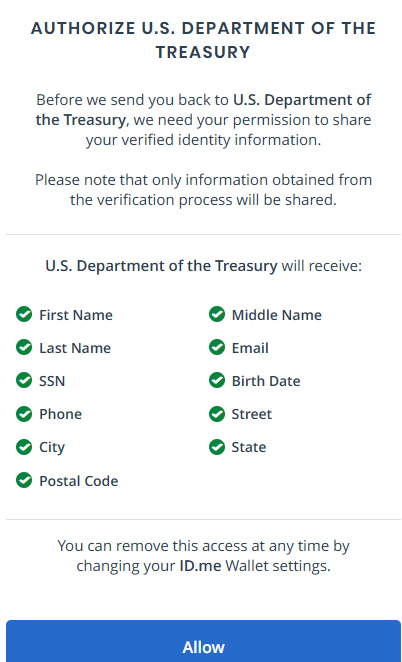
Authorize this information to be shared with TreasuryDirect. I believe that TD already has all this information, but the info is likely needed to confirm your login identity matches your account.
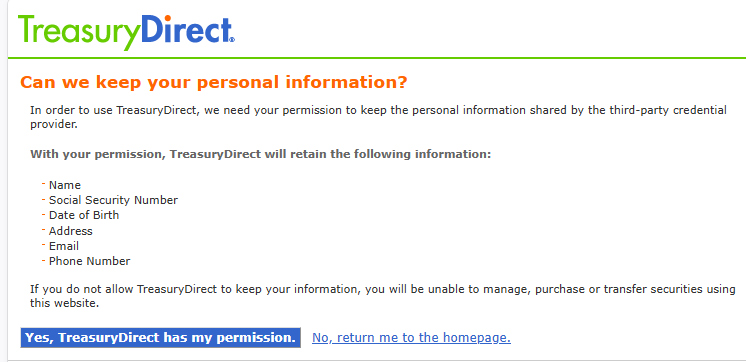
Confirm that TreasuryDirect can keep this information (which it already had) that was shared by the third-party provider (ID.me).
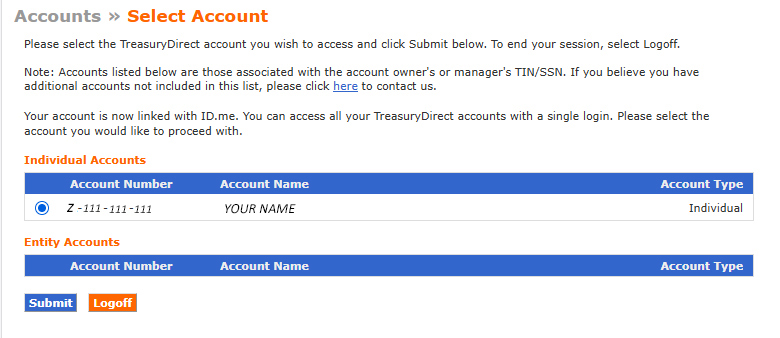
Select the account you want to access. In my case, the only option was my personal account. (My wife will need to log in separately for her account.) A person with both a personal and trust or entity accounts should see those options listed. You can log into one account at a time.
Conclusion
If you have a working ID.me account, linking it to your personal TreasuryDirect account is a simple process. That’s my experience. And I am going to give TreasuryDirect and ID.me credit for apparently working through most of the speed bumps, despite a very short launch path. (All logins will switch to ID.me on Oct. 28.)
But there many, many potential complexities. Please talk about your success and/or failures in the comments section.
Also see:
- TreasuryDirect is launching a controversial login system
- TreasuryDirect provides more guidance on ID.me transition
—————————

Donate? This site is free and I hope to keep it that way. Some readers have suggested having a way to contribute. I welcome donations, any amount. And FYI, ads on this site pay for about one visit to Costco.
—————————
Follow Tipswatch on X for updates on daily Treasury auctions and real yield trends (when I am not traveling).
Feel free to post comments or questions below. If it is your first-ever comment, it will have to wait for moderation. After that, your comments will automatically appear. Please stay on topic and avoid political tirades. NOTE: Comment threads can only be three responses deep. If you see that you cannot respond, create a new comment and reference the topic.
David Enna is a financial journalist, not a financial adviser. He is not selling or profiting from any investment discussed. I Bonds and TIPS are not “get rich” investments; they are best used for capital preservation and inflation protection. They can be purchased through the Treasury or other providers without fees, commissions or carrying charges. Please do your own research before investing.


Spent an hour trying and failing to register with id.me (each step failed at least twice). Reflected overnight, and ultimately decided to just simplify my (and my heir’s) financial life and get out of Treasury Direct altogether
Jay, I agree with you. I hope the Treasury has enough money for all the withdrawals coming before the 28th. I’ve done about half so far. There are plenty of other ways of investing your cash without this much hassle.
I get it. On the surface it seems more secure, but more secure is not “hack proof.” Putting more of your information in one place, just makes the failure of this private security more disastrous. Besides I have been using cash substitute ETFs that turn this ordinary income into LTCG at zero tax. Good reason to shift it all over to that – better returns.
Savings bonds are a minimal portion of Treasury debt, so cash-outs won’t be threatened. On the security issue, in my view the main change is swapping email verification (very open to phishing) with texting (widely used and less vulnerable, but not perfect). The real risk is that ID.me itself will be hacked, which in our AI era seems inevitable.
Dave,
It’s not only about hacking…. imagine this catches on and all financial institutions like your broker used ID.me. Think “sep 11” or it just goes down due to software error. You are locked out of your money as this is the verification method.
I set up my ID.me wallet. No issues. Then tried to sign in to Treasury Direct. All seemed to be going well…no issues with getting acceptable pictures. Pressed the final button to the TD login procedures. A banner popped up followed by an email from ID.me said that my brand new wallet has been suspended. So now I’m trying to sort out with ID.me how to un-suspend my wallet…to which I have no resolution a week later.
My wife and I tried to establish ID.me accounts. In both cases we got “can’t verify telephone number” – the cell numbers we have had for over a decade. So wait for video? My wife waited 35 minutes and the video rep quickly signed her in. I waited 56 minutes and got just text, no video. The rep wanted me to go back and do the entire process again (no doubt leading to another long wait). I gave up.
I just completed the process, which was stressful. I’m old school not using my iPad for my larger accounts, just desktop. Of course, the id.me system did not accept my phone selfie, so had to meet with “referee” to confirm my identity. As a retiree, I no longer need a camera on my desktop, so had to continue process on my iPad…thankfully, they sent an email to continue. They need to improve their technology so their system can accept a selfie.
My wife, groggy from a trip to Africa, completed the process today. No major glitches. Now we both have ID.me accounts and both have view/transact rights on each other’s accounts. Adapt and survive.
No need to talk down. Just shared an experience that hopefully can help others that don’t have a camera on their desktop.
“Now we both have ID.me accounts and both have view/transact rights on each other’s accounts.”
David, I’m just checking that I am not missing something because I think I have seen you phrase the view/transact rights this way more than once. When my wife and I have done the same, we have had to repeat that action for each new security purchased on Treasury Direct. So we would say that the granting of rights apply to the security rather than to the account as a whole. Has your experience been something different?
That is correct. Every single security needs to have the rights changed. That takes a LOT of time for the first setup. Then, you would need to assign rights for each new security. I’m not sure about roll-overs, though, but that wouldn’t matter much for short-term T-bills.
I bit the bullet and gave it a try. I realized being a senior, my hand 🫨 and takes many tries to get acceptable photos. Also if you got an old cell that does not take good picture, forget about this. Noone bother to take into account the seniors who have medical liabilities. Somehow my id.me wallet had a different birthday then my docs but system never told me this and just prompted to keep uploading my docs. I did get on chat after an hour waited and the told me what was wrong, but you just cant go back into ID.me and fix it. A workaround process is needed. Here was a shocking thing I got a apple watch and such a few weeks ago and a new cell number. The new cell number never worked for authentication on any financial site. Turns out the number we suspect is blacklisted in a security database all financial institutions use. Course nobody can verify. I then realized hows much the cell phone is your security device now. Might as well just get an arm tattoo too.
Four things:
Having already had an ID.me account for the IRS, it worked fine.
For my spouse’s account, all registrations were changed to co-ownership (WITH) from POD. Then transact rights were granted to my account. I saved a screenshot of the holdings, in the event needed for a Form redemption. Now, I can see my spouse’s bonds to get values, and redeem the bonds in my spouse’s account without my spouse having to setup an ID.me account. I am likely to redeem them next year for multiple reasons.
After granting transact rights, when looking at the bonds from my account, the values were updated to October values, and it appeared to let me redeem a bond that had not hit its 12 month holding period. This was all done the last week of Sept and the bonds hit their 12 month period in October, so it may have been a timing quirk, rather than a backdoor way to redeem a bond prior to a year. That said, if you want to redeem rather than setup ID.me, but cannot due to holding period, look and see and maybe it will let you!
Lastly, the govt apparently said that we will have a new AI run website (including Grok) to access all government services, and at least one report – possibly inaccurate – was that it would be so intelligent, you did not have to apply or create an account or verify identity. What? (I hope that only applies to current questions and not the ability to do actual transactions).
Early redemption? Only b/c the actual redemption would be in October. No waiver of 1 year that I can see/view
Maybe, but no redemption was possible in the primary holder’s account but was possible by the person with transact rights. Odd that one account allowed it but the other would not, on the very same bond, on the same day! Timing suggests proceeds would have been deposited in September, but maybe their timing has changed.
Seems TD old login ended a day early.
Unable to log in on September 27 2026 starting at 8am EST till 1:30 PM EST before I gave up.
This is a day before the new id.me log in is required.
Be careful with id.me as it is easy to make an error that will windup costing you much frustration and wasted time.
Wonder which fat cats got id.me to be the default login to US government site?
You are off by one month on the login change deadline, it’s OCT 28, or likely the 27th. You must have had some other glitch…
Hi David, Thank you for all the great work you do on this. I must admit I am still unclear on some of the details, so would like to run a few questions by you in case you have the time and patience to respond to them to the best of your understanding. I have Ibond, Tips and T-Bills and have been using TreasuryDirect, but do not want to sign up for ID.me, and have some questions. 1. Forsavings bonds, if I want to wait until 2027 to cash out the bonds, and will nolonger have the current system or ID.me access, how do I do that and how longdoes it take?
2. For Tips,I have some that mature in April 2027, Isthere any way I will be able to set up a reinvestment after October 28 if I don’thave ID.me? If I set up a reinvestment beforeOctober 28 using the current system and decide I want to cancel thereinvestment before April 2027, is there a way I can do that if I don’t haveID.me?
3. For T-Bills, I have some 1-month bills that I amthinking of setting up for reinvesting now through April 2027 before October 28using the current system. If I later wantto cancel any reinvestments before they are all complete, is there a way I cando that without ID.me?
Thank you again for all the helpful and important work you have done on this – Chris
The best option, which you would not like, would be to sign up for ID.me to allow for a gradual departure from TreasuryDirect in an organized fashion. Then kill your account with ID.me.
Question 1: I believe you will be able to use Form 5512 to request redemption of your savings bonds after the ID.me verification process begins on Oct. 28. https://www.savingsbondwizard.gov/forms/sec5512.pdf (The form may require “more” than a notary stamp.)
Question 2: I tried in the past but was never able to set up a reinvestment of a TIPS. It may be possible, however. I’d recommend using a brokerage account for buying TIPS at auction to greatly simplify the process. Having a new TIPS locked up in a TreasuryDirect account where you have no login access just doesn’t make sense. So, for the TIPS you own, you should immediately make sure you have correct banking information for the proceeds to be sent upon maturity. This will be hard to do after Oct. 28.
Question 3: You could schedule the T-bill reinvestments now and have them mature around April 2027. That should work fine, but if you want to change the reinvestments, that could be very difficult without login access.
Chris, on #1 see my post on 25th
Hi Aaron. I’m in the same boat as you. After much trying, here’s what TD said:
TreasuryDirect requires that the address on file be within the United States. TreasuryDirect will take the information provided in ID.me to update information within your account such as phone numbers and mailing addresses.
ID.me understands that changing your address is common and many people do it. It is still important to ensure the new address that you’re changing to is verified. ID.me provides a path for users to change their address once you have your proof of address document.
Navigate to the ID.me Help Center > Contact Support
Sign in with your verified ID.me credentials
Under What can we help you with?, select Managing my wallet
Under How can we help with your ID.me Wallet?, select Changing or updating my information
Under What information do you need help changing or updating?, select Changing my mailing address
Submit
Please reply to the initial email response to be assigned to a live support agent.
Provide proof of address document via secure portal if prompted by the support agent.
The next time you authenticate/log into TreasuryDirect, your information will update automatically.
Thank you,
Treasury Services
I am too scared to try it. My existing ID.me with foreign address has already gone off. If you login once with ID.me your old sign in will not work.
I live overseas and setup ID.me with a foreign address. My TreasuryDirect account still has a US address. The system will not allow creation of the wallet because the addresses are different. TreasuryDirect support are unable to change the TreasuryDirect account to a foreign address. Thus, I will soon lose access. I cannot liquidate because some bonds I bought earlier this year.
A US address is required to open a TreasuryDirect account, but not to maintain one. This detail was missed when designing it somehow.
Aaron, locate a trusted relative that is set up for ID.me (for TD) and add that person for the registration for your accounts (with transaction rights) and then at one year mark have that person redeem those bonds. Do a test for/on some small amount bonds that can be redeemed now. No guarantees but seems to work for some.
I’d like to know how to redeem sole proprietorship and trust Ibonds w/o one being ID.me registered? How does one change the acct manager to that/a trusted person that is ID.me registered…for each
Dr. “How does one change the acct manager to that/a trusted person that is ID.me registered”
Use FS Form 5446 to request TreasuryDirect account transactions that cannot be completed online. If a change to an Entity Account or Entity Account Manager is involved, see the instructions for additional evidence that may be required. Complete section “D-4 Change Entity Account Manager – New Manager Information” of the form. Evidence necessary may include a certified copy of: The trust document, if a successor trustee will be the new account manager.
I am against the mandatory ID.me account migration in almost every way. Its implementation is rushed (I believe intentionally to short circuit any kind of protest from coalescing), the timeline impacts people who just want to get their 1099 online in January when it didn’t have to, the elderly and other vulnerable populations without a smartphone will have difficulty completing the verification process, many account holders have no idea they will lose access to their account despite the emails and website postings, the idea of a private company being the only option to hold biometric Personally Identifiable Information of a government account is problematic when Login.gov is totally viable alternative and now the recommended solution for all agencies, it is very heavy-handed to disable existing accounts without a longer transition period (we are talking about millions of users after all), the company has shown itself to be less than reliable and responsive in real-world applications working with other agencies of the federal government in the past, and there is a political favoritism component to the contract they were awarded after making donations to the party in charge.
That said, I like buying I Bonds and T-Bills via Treasury Direct, I do this often, so I decided to be the first one in my family to create my ID.me wallet from scratch via Treasury Direct. Being technically savvy and experienced, I didn’t expect any real technical issue, but I was worried about failed steps in the process. Fortunately, it all went smoothly and I was back in my TD account after about 10 minutes of website, email and cell phone ping-ponging back and forth. So for those of you who plan to go ahead with this despite the concerns but have reservations about it going smoothly, this should ease your fears to some degree. It worked. There were no glitches in my experience.
Thanks for this information. It’s useful.
Some of your thoughts about id.me are as it goes in my experience.
Had my id.me account since 2018. Being an ex-service member, id.me provides a small discount on some consumer purchases (such as Apple).
Recently trying to update my phone number in id.me profile has been exercise in frustration that is not completed yet.
Text based security codes aren’t especially secure but if you don’t have other options so be it. An authenticator app is better than that.
I use a Yubikey for my more secure accounts that take it, like Vanguard. It’s a physical passkey. The other way is a software token most Android phones can create that use the API onboard your phone. Because I have a Yubikey I don’t use that.
Given I do not have an ID.me account. Would it be less error/problem prone to first go to ID.me and successfully setup the account and then go to TD to login?
Possibly, during this transition period, because you could still log in the traditional way until Oct. 28. You have that long to get the ID.me login stabilized. Try to make sure the info will match the info at TreasuryDirect … address, email address, etc.
I continue to be amazed by the data protection, or lack thereof, is just glossed over. Counting the number of “adverse” comments above, there are a lot of so-called sheep that are buying in. For example, what are the safeguards of your info being transmitted from ID.me to TD? None. Why does ID.me ask for permission? And the downside is…read the exclusions of liability and as one customer notes above about “funds being stolen” from TD and there has been no disclosure of that or remedy to preclude it from happening to you
This is an excellent point. A lot of people don’t realize they can be a victim until an incident impacts them.
My long-term girlfriend and her mother’s Tax guy retired last year so I started doing their taxes for them. Side note: ridiculous price for what’s basically a 1040EZ return (1040 + 1 extra form for taxable account distributions IIRC). They both liked to receive checks so that’s what I did. I didn’t notice any warning from TurboTax (if it existed at all) that the IRS would stop sending checks or I would have just requested direct deposit for both of them when I e-filed. In any case, this oversight led to having to setup ID.me accounts for both of them so they could add direct deposit instructions after the fact.
This was a royal PITA because my defacto mother-in-law doesn’t have internet and doesn’t want it (she’s 82). She has a very basic “smart” phone with a poor connection from her provider within her house. The automatic ID verification from ID.me failed for her, their app also sucks at centering the photo and adapting to lighting before it snaps. I ended up having to schedule a video call (days later), bringing my laptop and tethering my phone to provide internet (better signal from my mobile provider). The video call itself wasn’t too bad, but I had to also provide my identity so my involvement was logged in the event I were a predatory fraudster…I guess this is good, but it’s another PITA.
Once the account was setup, she was able to login with ID.me with some guidance.
For my girlfriend, either from prior practice with her mother or random luck, her ID verification and facial recognition was automatically validated and we didn’t have to go through the video call B.S. So..a few minutes for account setup instead of a couple hours of user time and days of waiting for the video appointment.
One tip I would give is take your facial recognition photo for the ID.me setup during the day near a window with bright diffuse light. This is what we had my girlfriend do after we saw how poorly the ID.me app adapts/adjusts to indoor lighting.
I couldn’t remember if I signed up for social security using ID.me or login.gov. I went to the site today and acted like I didn’t have a login. I chose to set-up ID.me and ssa gave me the following message:
_______________________________________________________________
You are leaving Social Security’s website
If you select the “OK” button below, we will redirect you to ID.me’s website.
ID.me is not a government entity but is federally certified to provide secure digital identity verification to government agencies.
ID.me is not under our control and may not follow SSA’s privacy, or accessibility policies located on SSA’s official website at https://www.ssa.gov/privacy.
ID.me’s identity verification process may include facial recognition to match your face to the photo on your identity document. Collection and storage of personal and biometric information is subject to ID.me’s policies that include its terms of service, privacy policy, and biometric privacy policy.
If you do not wish to agree to these terms, please select the “Cancel” button and choose a different registration option.
____________________________________________________________________________
It is outrageous that treasury is using a system that SSA says does not meet its privacy requirements. It doesn’t even make sense that SSA offered it as a choice much less REQUIRE it like treasury has done.
Seems like the answer can only be $$$ but to whom?
David, I’m curious….
From previous posts of yours I assume that you and I are pretty close in age…and despite good health, we have no idea how long we will live….
So I wonder why, ESPECIALLY after your excellent summary of the complications for heirs of dying with I-bonds and a TD account, you have not sold your I-bonds and moved the proceeds into your TIPS ladder.
I fully understand all the advantages of I-bonds over TIPS, but if your TIPS ladder contains enough rungs you can have a steady income with maturing TIPS at least twice a year (between now and 2039 when those become available), and annually beyond that. That’s liquid enough for most situations, and if pressed, most of us have other accounts to draw from without having to sell TIPS at a loss.
Especially at today’s TIPS yields, I don’t get why you would want to keep your I-bonds. The disadvantages of I-bonds vs TIPS just seem to me to outweigh the advantages. Is it reluctance to hold TIPS in taxable?
I look forward to getting rid of the last of my I-bonds (at 1.3% fixed) at the beginning of next month. They made a lot of sense in the 2010s through early 2020s, but they make no sense to me any more.
The reason is simple: My wife and I are a healthy couple and we co-own all the I Bonds. I do not expect any severe difficulties in dealing with the I Bonds after one spouse dies. I view the two investments differently, with I Bonds being a cash-equivalent account, continuously compounding tax-deferred. We will redeem those as we need the money. Redeeming them all at once would bring a huge tax hit. I use TIPS in a ladder to set aside specific amounts of inflation-protected cash year-by-year. I hold TIPS to maturity.
As a datapoint, I had an existing ID.me account (that was linked to the IRS); it (presumably because of the verification required when I linked it to the IRS way back when) had sufficient verification for TreasuryDirect, so no additional verification was needed.
Three potential issues I saw were (a) the ID.me account does not have my middle name or middle initial; my TreasuryDirect account has my middle initial; (b) The E-Mail address on my ID.me account and the E-Mail addresses on my TreasuryDirect accounts are different; (c) I have a personal account and an entity (trust) account; the latter has me as the trustee under my name (in identical form as the personal account) but has a differnet E-Mail address from my personal account.
Treasury said in advance entity accounts should like, and anecdotes of that working were pretty widely reported, and nothing else above is likely to be especially rare … so I rolled the dice.
Everything worked perfectly. I selected secure sign in, it sent me to ID.me, I signed in there to my existing account, it asked for permission to share my information with TreasuryDirect, I granted it, and I was sent back to Treasury and asked which account I wanted. (You have to log out and back in to switch between accounts, but I tried both and was successful.)
These aren’t extreme corner cases, but they are beyond the trivial “one person, one account, first/middle/last names identical, E-Mail addresses match” case. They seemed to do a reasonable job of matching; SSN was correct across the board for me, so that makes it easier … it might have been messier if entity account had a a TIN (my entity account has my personal SSN).
This is a catastrophe for US Expats. We are allowed to open and continue to use a TreasuryDirect account while living overseas (a US address is required at initiation of the account but not to maintain it and there is no statutory restriction on where you live to hold the account). ID.me also allows you to have a foreign address to initiate a wallet but you cannot link to TreasuryDirect because the verification options do not work for someone who lives overseas. Without access to the TreasuryDirect account we cannot access it to get the 1099 tax form each year so the choices are to move back to the US or liquidate the account. This has not been well-planned at all and the October 28 deadline is too short to really address the problem with new technical solutions.
My Mom is locked out now because although she uses my US address as her mailing address, she cannot use a VOIP phone for ID.me so she had to use her international phone number to register with ID.me. After a video call, she was able to get into ID.me and even logged into her IRS account. But when she tried TD, it locked her out of her account, and we are all guessing it is the international phone number.
Worst thing is she tried to go through the legacy signin and her account now requires her to use ID.me because she already was shown to have used it. Now we have no idea what to do. Legacy login worked just fine before.
When I locked myself out of my account, I called TD on the phone and they unlocked it for me. Your mileage may vary.
Long time reader, first time commenter. I just completed the ID.me process. I already had a verified ID.me account so it was fairly painless. It did bring over an old address in the process. This must be updated through ID.me. I noticed one thing on TD though. On the edit account info screen (on TD) there is a typical notice that you need to update any non-editable fields through ID.me and this notice:
It looks like if you ever update your address in ID.me to a non-US address you will be locked out of your account. I am not sure if ID.me will provide this same notice when/if you update to a non-US address.
Thanks for all your detailed guidance here. I had an existing ID.me account for the SSA, and adding the Treasury Direct link could not have been easier. Absolutely seamless. Next step is to see if my wife, who does not have an existing ID.me account, can replicate this experience.
To link the ID.me account to treasury requires that you show either a passport, a passport card, or a state drivers license. This appears to exclude green card holders living in the USA but not driving cars. At least at first attempt it is impossible to proceed. I will retry with a videochat with id.me and see if they accept green cards that way and if that works will update.
I woke up on Monday and logged in using ID Me where I had an existing login. It was seamless and I had no issues logging into my personal account and a corporate account. A bonus was that the two accounts (personal and corporate) used the same email in ID me and Treasury Direct gave me the option to get into both without logging in twice. I conducted several transactions with no issues – a bond transfer, some bank changes, and a bond registration change.
Despite all the anxiety I personally feel this was a much better experience compared to the legacy TD login which I find to be clunky and convoluted. The biggest plus is it combined my personal and corporate accounts. Another bonus is the login is the same as my other government logins that we use with the IRS and VA systems. All in all I’d consider it an upgrade as long as you dont run afoul of the process and have to contact the dreaded TD support process.
My DW has yet to sign up for ID me so the Jury is out on that process for her personal account.
I signed up for ID.me on Sunday. I signed in on Treasury Direct ,in the past , with .gov login. I had no problems switching to ID.me.
I currently have a 5 year tips that will mature in April , 2027 , purchased through my brokerage account with Schwab.
I also have an Ibond , through Treasury Direct , purchased in 2022.
I used to buy Tbills through Treasury Direct before 2021, now I buy Tbills through my Schwab brokerage account.
I never had any problem going to Treasury Direct to get my tax form when my TBills matured .
I normally buy 4 weeks bills through TreasuryDirect. When you buy TBills through your Schwab brokerage account can you set up automatic reinvestments as you do with TreasuryDirect?
PS: My last 4 week bill reinvestment went off at
3.839%
You can auto roll them in Schwab, however you will have to wait a week based on my experience. Example: Your 4 week T bill matures today 9/15/26, you would be eligible for the 9/17/26 auction settled on 9/22/26. They do not let you go into debit (even with a margin account) to auto roll T bills.
Fidelity has auto rolling buys on T bills which work as expected, paying out expiring T bills on 9/15/26, settlement on newly auctions T bills on 9/15/26. However the money from the auction date until the settlement date will negate any purchasing power in your account by the same amount. (Margin and non margin accounts). Example: You have $15,000 of settled cash. You buy $10,000 of T bills on the 9/10/26 auction. Your available balance for trading in your account until the 9/15/26 T bill settlement will be roughly $5,000 and change, not $15,000. On 9/15/26 your available balance for trading will once again be $15,000, from my experience.
Automatic reinvestments should be possible. Fidelity offers that when you place the initial trade as a checkbox if I recall correctly from sometime ago when I set it up. Also, an additional comment on Id.me login process, if one does not have an ID.me account, when it says Sign-in to ID.me screen, there is a inconspicuous link at the bottom for those who do not have an existing ID.me account which says soemhting like “Create an ID.me wallet” which is not obvious at first what they mean by that – but then I learnt that it is prompting to create a new ID.me account for those who do not have an existing account. Otherwise, one simply enters email and password and uses forgot password and retries several times before realizing that if you dont have existing account, you must choose the create wallet link and set one up by following the next prompts.
I signed up yesterday for my ID.me account and everything went fine. I wanted to wait until the launch date so I could use the link right through Treasury Direct. I was thrown off though just as one user was who commented by the selfie video. The video you take comes up all distorted. I wasn’t expecting that. I think the reason then for failed selfie videos is that it is comparing the video you take to your license picture. So if you possibly have an older license or an older picture on your license it may not be able to verify that it’s the same person. My license picture just happened to have been taken this past February so no issues for verification.
I’m pretty sure what it’s doing is reflecting all those psychedelic colors off your skin to ensure it reflects back, and distinguish real skin from a mannequin. That’s why, at least on a laptop, it says to crank up your brightness first.
I’d buy a Yubikey so that you can use “security key” authentication from your desktop/laptop and get rid of SMS/phone call authentication. It also works as a second-factor for Vanguard. It’s the same underlying technology underneath but does not involve any biometrics. So some sites (Truist Bank) accept that a Yubikey is a form of passkey, while others (T. Rowe Price) refuse it.
This security is a can of worms. Of course the longer they can lock you out of your money, they make more.
Very helpful guide. Thanks for the detailed walk-through.
I’m not looking forward to my first ID.me login. I tried to set up an ID.me sign in with Medicare and it failed when I got to the “take a selfie” part. Fortunately, they allowed a login.gov sign in and that worked perfectly. I keep hoping they will add a login.gov option or punt the due date until Feb 28, 2027 so I can purchase my 2026 and 2027 i-bonds and get my tax form before having to run the ID.me gauntlet.
I was concerned because my TreasuryDirect account had my name listed as “FirstName MI LastName”, but my existing ID.me account has my name as “FirstName LastName”. I called the TreasuryDirect telephone number last week and was told to send a message through TreasuryDirect asking them to change my account name to match my ID.me name. I never got a response from TreasuryDirect.
After reading this post, I figured I should try to see if I could log in. (I figured the worst that would happen would be that TreasuryDirect wouldn’t be able to link an account to my ID.me account.)
My experience mirrored David’s and my account popped right up, showing my name as “FIRSTNAME LASTNAME”. It’s now correctly linked to ID.me. (Coincidentally, my name is now listed on the TreasuryDirect account information page as FIRSTNAME MIDDLENAME LASTNAME. I guess foolish consistency and all that….)
Just another data point.
Just finished the process and got through it with some hiccups. I had already created my id.me account but hadn’t validated anything. Started the process on my laptop from the Treasurydirect.gov site and after logging into id.me it sent a text to my phone to proceed from there. From my phone it prompted me to take pictures of my drivers license back and front and that worked fine. Then it wanted my phone to take a video of my face and for reasons I don’t understand the image of my face in the id.me browser app looked distorted. It had me try several times and then it said I exceeded the attempts. It sent me back to my laptop and had me upload a pic of a secondary id which for me was my passport. After a few more prompts it started a video call on my laptop and within a few seconds an id.me rep came up. She had me verify some information and then I had to show her both my drivers license and passport. That went very smoothly and she said I had been validated. She said I would need to go back to the treasury direct site and login in and agree to share some id.me information with treasurydirect. That all worked perfectly and I was brought to my account.
I had a similar experience. The problem is to assist non-tech savvy relatives who live a thousand miles away with getting them to plow through the steps. Adapt, improvise & overcome
If you say that you do not have a smartphone, then as long as your computer has a webcam and you grant it permission, you can use your computer instead. I did not realize this until today. It makes the process much more streamlined.
I already have an ID.me account so logging into TreasuryDirect using it was simple. I like that you can log into both your personal account and your trust account with the same login (though I assume you can’t toggle between accounts?). Weirdly, though, I feel much less secure using ID.me with text authentication than I did using the old multi-step login with the icon, etc. I liked seeing the photo of the cat or sunflower that I selected :-).
I logged into Treasury Direct using ID.me for the first time today and it was totally straightforward. I am considering getting a security key to upgrade the security of my multi-factor authentication. Now that my ID.me is linked to both my IRS account and Treasury Direct accounts, it feels especially important to guard against possible identity theft. This page on ID.me gives some info on security keys: https://help.id.me/hc/en-us/articles/360017969214-Set-up-Security-Key-MFA-on-your-ID-me-Wallet
I think the same security key can also provide additional protection for investments accounts, so that will also be a plus for me. I first read about security keys on Mike Piper’s excellent blog: https://obliviousinvestor.com/security-keys-the-most-secure-way-to-log-in/
I recommend the one of the YubiKey 5 series.
Their cheaper “security key” can only serve as such, or as a “passkey” on sites that allow it to serve as one.
The YubiKey 5 can also serve as an “authenticator app” (i.e., scan a QR code, then generate six digit codes to type in, also known as TOTP) if you’d like it to be one. You install “Yubico Authenticator” software on your machine, and when you connect the YubiKey, you can access the six-digit codes for each site you’ve set up. You should put a password on the YubiKey if you do this, to ensure that you have to be physically present to access the codes, if you leave it sitting in your machine and it gets compromised.
Thank you so much! I will look into this.
Can we just finally accept that Treasury Direct is toxic and that it is not worth owning anything at it including I bonds given the grief and trivial limits. Lets focus this website’s discussion onto TIPS duration and term risk.
Nope. I Bonds are a much better traffic draw than TIPS. It has been that way for 15 years. So I’ll keep writing about both.
I use I bonds as an emergency fund. The tax deferral and lack of duration risk are really important to me. TIPS wouldn’t work nearly as well.
Treasury Direct is switching to the same login system that the IRS uses. That hardly seems toxic.
One bright spot of id.me is that hopefully TreasuryDirect lock-outs will be more rare, or at least perhaps there will be a self-service option to unlock. Over on bogleheads.org, someone who failed the old identity verification process when initially signing up for TreasuryDirect, was pleasantly surprised that they now have an account after completing id.me.
Agree. I already had id.me because that was the only way to get an irs account. Since I started using it, I’ve also started using it for SSA and medicare.
When I created my id.me account it went smoothly with no issues. When my daughter created hers for yet a state government website, she did have to go through the video call which she described as taking all of about 5 seconds, which she described as very simple. Still need to get my wife to create hers as well.
I’ve had and used a TD account for about 12 years or so and have experienced no issues, having traded and rolled T-Bills and having purchased the maximum amount annually, including the extra $5K each year via tax refunds, when that program was available.
I’m sorry that some have had issues, but given my own experiences, I’m certainly not going to change my plans. I find nothing toxic whatsoever about any of the experiences I’ve had.
Cheers
Agree that TreasuryDirect is toxic. My funds were stolen over a year ago, and they have provided no recourse or explanation. I’ve been unable to get a response from them, even after contacting my members of Congress.
Thanks for taking the jump and testing it out. It’s nice to see that everything worked for you.
I am always wary of new software and will wait a few days for them to work out any remaining kinks before trying it myself.